Showing posts with label TSQL. Show all posts

18/07/2026

Claude as your Teacher

I've been focusing and studyingon SQL server performance tuning for more than a year now. I was involved in performance tuning task before, but I wanted to be an expert on that area. So I have been following online courses and doing some self-studies and reading books in my spare time.

However, I still feel I lack real world work, which require to be an expert in that field. Best way to get real world experience is find a job on that area. But in my current job I get very little performance tuning experience. I do get lot more SQL development experience. So do use my knowledge on performance tuning when I develop SQL stuff (e.g. stored procedures). 

This led me to search for some real-world experience, without leaving my current job. I did find some information on internet, but didn't find much useful or catered for me (mostly because performance tuning is case by case issue, I think).

Idea came to me suddenly recently, what if I can use AI tool as my real world experience provider. So I started working with Claude to get something developed. I used "Project" feature in Claude chat.

Let us first have a quick look into Claude Project feature.

You can find Project in Claude in left hand side menu:


Claude Projects has 3 components:

  • Memory -> This is something claude autogenerate, while you work on the project. But you can edit if you noticed something is not correct.
  • Instructions -> Most important part. You can give instructions specific to this project and Claude will follow this everytime it do a task within this project.
  • Files -> Any additional knowledge you want to give to claude on the subject.

Your recent chats relate to this project appear under "Recents" section.

So how did I get Claude to give me (or rather teach me) performance tuning exercises?

I gave following prompt/instruction on the project:

I want to challenge my self by resolving various SQL server performance issues. In order to do this I want you to think like a SQL server performance tuning expert and generate me scenarios with performance issues. I want you to generate these challenges in 3 difficult levels -> Easy, Medium and Expert. When I'm ready, I'm going to ask you to generate a scenario and present me in a particular difficult level. For these challenges, you are going to use AdventureWorks sample database provided by Microsoft (which is publicly available) and StackOverflow database which is also available publicly. I want to generate a query or stored procedure or function with a issue and just tell me what users experience when they use it (issues they face). For this you might also need to give some context information also (e.g. parameters particular stored procedure is running, indexes which are already in use) to me. You might also need to give some script to setup the data and other objects to match the scenario in my testing database (e.g. create or drop index scripts). Once you give me the challenge, I will resolve it and present you the solution, for your evaluation. 

Then on project chat area, I gave following prompt:

Please read the instructions given and present me with Easy challenge.

I'm actually really impressed with results. It gave me a scenario where I have to inspect a slow running stored procedure and identify the issue and give solution for it. Not only it gave me a scenario and excersise, it gave me instructions to setup the database in a manner where the issue is occurring.

I'm not going to explain the whole exercises here as it will make this blog very long. But here are the highlights.

In Step 1, it gave me a script to setup the database. Claude used AdventureWorks database. Because default data didn't cater for this exercise, it gave a script to create alternative "SalesOrders" table with about 1.5 million rows in it.

In Step 2, it continued the setup and told me to create an index in a specific way.

In Step 3, it gave me script to create the troublesome stored procedure.

Finally Claude explained the scenario. Here are the actual text:

There's a "Sales by Year" report page in the app that calls dbo.GetOrdersByYear with a single year, e.g. EXEC dbo.GetOrdersByYear @Year = 2022;. Users are complaining that this report is sluggish and keeps getting slower the longer the system's been live — it used to feel snappy when the table was small, now it's a few seconds and climbing. The DBA is confused because there's a perfectly good index sitting on OrderDate that includes the exact columns the query returns, yet it doesn't seem to be helping. CPU also ticks up noticeably whenever the report runs, even though each call only returns one year's worth of rows.

What I want from you:
Run the proc with the actual execution plan on and SET STATISTICS IO, TIME ON, then come back with three things — the root cause (why that index isn't being used the way you'd hope), your fix (the rewritten proc), and the evidence that it worked (before/after logical reads, plan operator change, and duration). Keep the proc's signature the same; the caller shouldn't have to change how it invokes it.  


Not a very bad exercise to start with, isn't it?

I was able to resolve it. When I presented the solution, for my surprise, it showed me some minor things (e.g. data type conversion, which I didn't think of in this situation as it didn't contribute much), I missed.

I'm going to continue to use it. Hoping to blog a about each exercise, and my solution, so you can also learn something from it. If you have any ideas to improve this project, please comments under this blog.


01/07/2026

I LIKE it with ESCAPE

Most of you who are in TSQL world like me have used LIKE operator to find strings that not exactly match or find a row which contains a specific word.


For example, if you want to find names that starts with "ST", you would do someting like this in TSQL:

SELECT DisplayName FROM dbo.Users

WHERE DisplayName LIKE 'ST%'

This will bring display names like "Stephen", "Stanley", "Stone" etc.

But recently, I came across neat trick I can use with LIKE operator in TSQL, specially when using wild card charaters.

LIKE operator accept several wild card characters:

  • % matches any string of zero or more characters (this is the most used)
  • _ matches exactly one character
    • LIKE 'ST_' => matches => ST5, STT, ST3, etc (exactly one character after ST)
  • [...] matches any single character in a set or range (like [a-f])
    • LIKE 'ST[a-f]phen => matches => STaphen, STbphe, STcphen, STdphen, STephen, STfphen (characters from a to f)
  • [^...] matches any single character not in a set or range
    • Similar to above, but it is NOT match
When you using wild card characters like this, what if search string contains, wild card characters in it and you want to search fo them?

That is where ESCAPE hint comes handy.

For example let us consider following:

SELECT * FROM Products WHERE ProductCode LIKE '%_DISCONTINUED%';

In here we want to search for product codes, ended with "_DISCONTINUED" E.g. CAT1_DISCOUNTINUED, LOSS_DISCOUNTINUED. In other words we need "_" character (which LIKE operator consider as wild card character) in the search string.

In that scenario, we can change the T-SQL like below:

SELECT * FROM Products WHERE ProductCode LIKE '%\_DISCONTINUED%' ESCAPE '\';

This tells SQL parser, we are using "\" character as escape character and we escaping "_"character and telling LIKE operator to include it in the search.

If we don't use escape character, LIKE "%_DISCOUNTINUED%" will result in results like "ADISCOUNINUED", "IGNOREMEDISCOUNTINUED" which we really don't want.

Now \_ means "a literal underscore," and the query only matches rows where that underscore is actually there. The ESCAPE '\' clause is what tells SQL Server "hey, whenever you see a backslash in this pattern, treat the next character as literal, not special."

You don't always have to use ackslash, by the way — any single character works, as long as it's one you're not otherwise using in the pattern:

SELECT * FROM Products WHERE ProductCode LIKE '%!_DISCONTINUED%' ESCAPE '!';

Above T-SQL also brings same results.

Consider a example you want to find values like 50%.

SELECT * FROM Discounts WHERE Description LIKE '%50\%%' ESCAPE '\';

In above example you can see two % signs together, one sign tells SQL server next character appear need escaping from wild card treatment, there fore looking for 50%.

This setting is per query, andn will not effect all queries you execute after that.

Hope you have learned something new today like me.

25/05/2026

All Constraints in SQL Server

Last month we discussed quirky check constraint on SQL Server. That made me think of all constraints in SQL Server.


What is a constraints

Before we actually see all the constraint types in SQL Server, let us find out what is a constraint in SQL Server and why it is there.

Constraints are basically guard rails in database to prevent invalid, inconsistent and meaning data in tables. It is a rule SQL Server enforces automatically on a table column or set of columns.

Instead of trusting database users or applications, SQL server itself can enforce these rules to make sure data is protected.

Example for database rules are:

  • A person should not have two identical NIC (social security) numbers
  • An order should always belong to a customer
  • Age should never be negative

Constraints not only help to keep data in check, but it also help SQL Server Optimizer to arrive at better execution plans. For example, if optimizer knows data in a column cannot be null, it can create a plan which was otherwise not possible.


01. Primary Key Constraint

I think most important of all constraint is primary key constrint. Basic use of Primary key is identifying a specific row in a table. It is actually a combination of NOT NULL and UNIQUE constraints, which means you cannot have null on Primary Key columns and each value need to be unique. Otherwise SQL server cannot identify the row.

One table can have only one Primary Key constraint.

Primary key can be defined two ways. You can specify it as constraint on it's own line (like below).

CREATE TABLE Customers (

    CustomerId   INT           NOT NULL,

    Email        NVARCHAR(255) NOT NULL,

    FullName     NVARCHAR(255) NOT NULL,

    CONSTRAINT PK_Customers PRIMARY KEY (CustomerId)

);

or you can specify against the column. But in this case, you cannot specify a name for the constraint.

CREATE TABLE Customers (

    CustomerId   INT PRIMARY KEY,

    Email        NVARCHAR(255) NOT NULL,

    FullName     NVARCHAR(255) NOT NULL,

    CONSTRAINT PK_Customers PRIMARY KEY (CustomerId)

);

When you add a primary key to a table, that table is physically restructured to sort on specified primary key column values (default behaviour, but can be changed).

You can have composite primary keys. Which means you can define a primary key on more than one column.

CREATE TABLE Customers (

    Surname NVARCHAR(100)  NOT NULL,

    Email        NVARCHAR(255) NOT NULL,

    FullName     NVARCHAR(255) NOT NULL,

    CONSTRAINT PK_Customers PRIMARY KEY (Surname, Email)

);

Experts recommend to have primary key in every table.


02. Foreign Key Constraint

Foreign key constraint create relationship between two tables. This rule make sure, value user enter into the column actually exists in the foreign table.

For example, let us consider Order table.

CREATE TABLE Orders (

    OrderId    INT  NOT NULL,

    CustomerId INT  NOT NULL,

    OrderDate  DATE NOT NULL,

    CONSTRAINT PK_Orders PRIMARY KEY (OrderId),

    CONSTRAINT FK_Orders_Customers

        FOREIGN KEY (CustomerId)

        REFERENCES Customers (CustomerId)

);

In above example, CustomerId column in the Orders table reference (or have a relationship) with CustomerId field in Customers table. Which means, user cannot enter a customer id which doesn't exists in the Customers table into Orders table. This make sure orphan or invalid data is not entered into Orders table.

You can have self referencing Foreign keys. For example, see below Employees table:

CREATE TABLE Employees (

    EmployeeId INT           NOT NULL,

    FullName   NVARCHAR(255) NOT NULL,

    ManagerId  INT           NULL,  -- NULL means "this person has no manager" (the CEO, basically)

    CONSTRAINT PK_Employees PRIMARY KEY (EmployeeId),

    CONSTRAINT FK_Employees_Manager

        FOREIGN KEY (ManagerId)

        REFERENCES Employees (EmployeeId)  -- references the same table!

);

In here, "ManagerId" column has self-referencing relationship with EmployeeId column in same table. Basically, manager id is employee id of the manager of that particular employee.

As an additional feature, you can specify, what action to take when referenced column is updated or deleted.

CONSTRAINT FK_Orders_Customers

    FOREIGN KEY (CustomerId)

    REFERENCES Customers (CustomerId)

    ON DELETE CASCADE   -- delete the order if the customer is deleted

    ON UPDATE NO ACTION -- (default) block updates that would break the link

In above example if a customer is deleted in Custoemrs table, all orders reference by that customer id, will be also deleted.

It is recommend to use these actions carefully as it can create un-intended behaviours.

You can have foreign key constraint on multiple columns - Composit Foreign key. 

For example, consider following scenario:

CREATE TABLE OrderItems (

    OrderId   INT            NOT NULL,

    ProductId INT            NOT NULL,

    Quantity  INT            NOT NULL,

    UnitPrice DECIMAL(10, 2) NOT NULL,

    CONSTRAINT PK_OrderItems PRIMARY KEY (OrderId, ProductId),  -- composite PK

);


CREATE TABLE OrderItemNotes (

    NoteId    INT            NOT NULL,

    OrderId   INT            NOT NULL,

    ProductId INT            NOT NULL,

    Note      NVARCHAR(1000) NOT NULL,

    CONSTRAINT PK_OrderItemNotes PRIMARY KEY (NoteId),

    CONSTRAINT FK_OrderItemNotes_OrderItems

        FOREIGN KEY (OrderId, ProductId)               -- both columns together...

        REFERENCES OrderItems (OrderId, ProductId)     -- ...must exist as a pair

);

In above example, OrderId and ProductId is the primary key of the OrderItems tables. Then those two columns were referenced in OrderItemNotes table with a foreign key relationship. Important thing is combination need to be unique, therefore, you need Primary key or unique constraint on parent table on those columns you reference in child table.

However, note that two columns need to be in same table.

When referencing columns, child table doesn't have to have same name for the columns. But need to have compatible data types and need to match the order.


03. Unique Constraint

Keep all values in a column unique and no duplicates are allowed. For example, let us consider Email column in Customers table.

ALTER TABLE Customers

ADD CONSTRAINT UQ_Customers_Email UNIQUE (Email);

Above constraint make sure no two customers have same email address.

Unlike primary key, you can have multiple unique constraints defined on a table.

Unique key constraint considers NULL as a value and allow 1 null value (no duplicate nulls though). You cannot have filtered unique constraints; however, you can create unique index which makes the same functionality (we will not discuss about indexes here).

Like primary keys, you can have unique constraint on multiple columns. Which means uniqueness is checked across columns.

-- A customer can't place the same order twice on the same day

ALTER TABLE Orders

ADD CONSTRAINT UQ_Orders_CustomerDate UNIQUE (CustomerId, OrderDate);


04. Not NULL Constraint

Make sure column always have a value (no null values are allowed). This check is enforced every time row is inserted or updated.

CREATE TABLE Products (

    ProductId   INT            NOT NULL,

    ProductName NVARCHAR(255)  NOT NULL,  -- can never be empty

    Description NVARCHAR(MAX)  NULL,      -- optional

    Price       DECIMAL(10, 2) NOT NULL,

    CONSTRAINT PK_Products PRIMARY KEY (ProductId)

);

In above example, ProductName cannot be null, always need to have a value. But in contrast, Description can be null. Also note Primary key constraints automatically enforce not null.


05. Default Constraint

This constraint makes sure there is always a value in the specified column, even when user didn't insert a value.

CREATE TABLE Orders (

    OrderId    INT          NOT NULL,

    CustomerId INT          NOT NULL,

    OrderDate  DATE         NOT NULL,

    Status     NVARCHAR(50) NULL CONSTRAINT DF_Orders_Status DEFAULT 'Pending',

    CreatedAt  DATETIME2    NOT NULL CONSTRAINT DF_Orders_CreatedAt DEFAULT SYSDATETIME(),

    CONSTRAINT PK_Orders PRIMARY KEY (OrderId)

);

In above example, if user didn't specify a value to Status column, value "Pending" is get inserted. However, if user specify "NULL" value to Status field explicitly in the statement, NULL will be set for that column. Default value only applied when statement (insert or update) doesn't explicitly specify a value. To avoid this, you can have NOT NULL constraint on columns with default values.


06. Check Constraint

Check constraint allow you do define a custom rule using any expression that evaluate to true or false. If the expression evaluates to false for a given row, the insert or update will fail for that row.

ALTER TABLE Products

ADD CONSTRAINT CHK_Products_Price CHECK (Price > 0);

In above example, check constraint make sure, users cannot insert or update a row where Price is less than or equal to 0.

You can have check constraints on multiple columns:

-- A multi-column check: end date must be after start date

ALTER TABLE Promotions

ADD CONSTRAINT CHK_Promotions_DateRange

    CHECK (EndDate > StartDate);

However, if condition evaluate to NULL, then condition will pass the check. To avoid this you can pair the check constraint with NOT NULL.


Disabling Constraints

You can disable Foreign key constraints and Check constraints temporarily. This tick is used when loading data to a table fast (bulk load).

-- Disable a constraint

ALTER TABLE Orders NOCHECK CONSTRAINT FK_Orders_Customers;


-- Re-enable (and verify existing data)

ALTER TABLE Orders WITH CHECK CHECK CONSTRAINT FK_Orders_Customers;

Note that "WITH CHECK" tells SQL server to validate all existing rows. So if validation fails for any of the rows, constraints will not be enabled.

You can bypass this by specifying WITH NOCHECK, but this is not recommended.

If constraints are re-enabled with NOCHECK, they are marked as NOT TRUSTED. Which means those constraints will not be used in query optimization or in execution plan building (i.e. SQL server will not be believing data is valid).

01/05/2026

SQL Server Quirky Check Constraints

Recently at work, I found out curious table structure. I found out in one of the table, primary key had foreign key constraint. Well you will ask what's the strange thing about that? The strange thing is, this foreign key is referring to it self. To be clear, this is not a composite primary key, just a single column standard primary key. Investigation showed that it was done by mistake, no harm done, remove it and every one lived happily ever after.

But that got me thinking, why would SQL server allowed it? Does it has a use case? Curiously I went to find out about it more.

So code for this is something like below:

ALTER TABLE dbo.Employee WITH CHECK 

ADD CONSTRAINT FK_somename 

FOREIGN KEY (EmployeeId) REFERENCES dbo.Employee(EmployeeId)

So as would any one in this AI age would do, I have asked the question from 3 different AI models and all 3 basically gave the same answer.

As suspected, although valid syntax, this has no valid use case.

As a check constraint, this is utterly useless. Check constraint suppose to check value in foreign table already in source table. In this case of course value is already in source table because both are same and same column.

So will it fail when I insert a new value? No.

When inserting a brand new employee Id (e.g. 1010), value doesn't exists in the table yet. So FK constraint should fail. But it doesn't because order of operations happens in SQL server make sure it doesn't fail.

SQL Server's order of operations for an INSERT with FK constraints is roughly:

  • Write the row into the table (tentatively, within the transaction)
  • Then run the FK constraint check against the table's current state
  • If the check passes → commit. If not → rollback.
In step 2 new id is already in the table, even though it is not committed. There fore FK rule pass. There fore, no rollback.

Is it ok to leave it if I found such a quirk? No. It is no harm removing it. Plus it add although tiny, overhead to the insert operation. With thousands of insert these tiny overheads can add upto become issues. So remove it if you found a one.

Why does SQL Server allows it?
Well my geuess is not by design decission, probably by accident when designing all constraint rules.

If you find any useful use case for this, please let me know in comments.

This interesting nature of check contraints made me thinking, we should re-visit all SQL server constraints and see what they are (just for fun and education). I might try to write a blog on that next month.


21/03/2026

SQL Server SESSION_CONTEXT

Last week I came across intresting challenge. I was enhancing an auditing framework for application. This application used SQL triggers for auditing. Basically all tables in database (excluding some system table), had auditing fields such as created date, created by, last modified date and last modified by. Each table where it wanted to audit, had triggers to write values of those field everytime row is updated. Audited data was written to big audit log table. Basically everytime row is updated (or created) above audit fields were updated by app, then trigger write the values of those auditting fields to audit log. But issue was, how to track who deleted a row?

When you delete a row, application cannot write to those auditing fields. I mean you can write, but that will be just stupid to update each row just before it get deleted. That will increase writes just to make it auditable (plus extra audits). So I had to find a solution.

My research showed one of the ways to tackle is SQL Server Session Context.


It is a simple concept introduced in SQL Server 2016. Session context is array of key-value pairs attached to a session.

So in your session, you can specify session specific meta data in this array and read it from SQL server to make different dicissions based on the meta data specified for connection. It is like dictionary attached to your connection.

Session context is stored on memory, therefore, it is fast. It is scoped for session and therefore, isolated from others.

So how to make it work?

First you need to set the values in the context:

EXEC sp_set_session_context 

    @key = N'UserId', 

    @value = 123;

Then you can use those values through out your session:

SELECT SESSION_CONTEXT(N'UserId');

If you don't want to make it updatable, you can set the read-only flag:

EXEC sp_set_session_context 

    @key = N'UserId', 

    @value = 123,

    @read_only = 1;


So how did it help my situation:

Well, just before the delete, I could set the "UserId" or "OperatingUserId" like variable in the session context. Then on the trigger, I can read this value and create the audit log for delete with correct user id.

You will say 'Well, it is still a additional write, just before delete?'. 

Yes and No. It is a update to connection, which is held in small part of the memory, so it is not going to write to disk. In fact there is a limitation on session context. Session context only allow maximum 256 key-value pairs, but total size need to be under 1MB (approx).

But be aware it is not a place to hold password like secret information, because if multiple people share the connection (like through application), can see the whole context.

In a connection, where session is shared (like through multi user application). It is vital that you set the userId like values just before where it is going to be use. Otherwise you will be using wrong values, because other users may also set it. There might be concurrency issue, but in my case, rows are deleted in-frequently, so it was ok.

In addition to auditing, you can use it to identify tenant when you application is multi tenant. And it can also be used with row level security (cuatiosly).

Don't over use it, just use it sparegly, 

There are know issues, where session context provide wrong results when queries go parallel. But in my case, delete is always single threaded.


10/01/2025

Introduction to SQL Server Statistics - Tutorial

Wishing you all, my loving readers, Happy New Year 2025!

This is the first blog for the year 2025. As a new initiative, I'm going to (try to) write some tutorials on some selected features of the SQL server. This is my own take of these features, and written using knowledge I acquire over the years. Hope this will give something for the society. I'm also hoping to create a Youtube video associate to this. When I done, I will update the page to link to that.

Introduction to SQL Server Statistics

What are SQL Server Statistics

SQL Server statistics are mainly used by Query Optimizer, therefore before we talk about statistics, we need to know little about how SQL Server Query Optimizer works.

When running a query, there can many ways to execute it (different ways to get data, different ways to join them, etc.). Therefore SQL server need a plan before executing a query. We call it Query Plan.

Since there are can be many combinations of ways to execute a query, there can be lot of plans that optimizer can come up for one query.

Therefore, need to find the optimized plan, the best plan (or rather good enough plan …). Optimizer only have limited time to come up with a plan. It has to finish and present the plan quickly as possible. In this process optimizer, will try to find good enough plan quickly as possible. Hens, it need all the help it can get. 


In order to create the optimal plan, Query Optimizer analyse the query and then it need to know meta data about data that query is looking for.

For example query can be looking for total number of orders for one particular customer placed during a date range. To create plan for this query, optimizer need to look into orders table and customer table. 

It need to know roughly how many orders are placed during the given time period. Because depend on the number of rows we might need to do different things to aggregate the data. For example, if we find 100 rows, we can aggregate one way and if find 1M rows, we might not be able to use the same approach. 

It also need to allocate memory for query to run. In order to estimate amount of memory to allocate, it need to estimate how many rows it is dealing with.

It cannot count rows, because that will take lot of time. Optimizer need to report back to SQL server quick as possible.

So it need to find out how data is distributed on the order table. We call this cardinality estimate. This is where statistics come to play. Statistics hold how data is distributed in a table/column.

Creation of SQL Server Statistics

Statistics are create on indexes and columns. It can be on single column or combination of columns.
Two types of statistics
• Statistics create for index (can be multi columns)
• Statistics created for columns (only created on single column)

Statistics have 3 components
• Header -> meta information about statistics
• Density -> mathematical construct of the selectivity of column or column
• Histogram -> show how data is distributed

You can see statistics information by running following command

DBCC SHOW_STATISTICS(MyTable, MyIndex);


Let's create "Employee" table, which have Employee Id, Age, Salary and Gender as an example:
CREATE TABLE Employee (
    EmpId INT PRIMARY KEY, -- Primary Key column
    Age INT,    -- Integer column for age
    Salary NUMERIC(18,2),  -- Numeric column for salary with precision 18 and scale 2
    Gender VARCHAR(10),-- Gender of the employee
);

We will populate the table with some random data:
-- Insert 1000 random rows into the Employee table with salary rounded to the nearest 500
SET NOCOUNT ON;

DECLARE @i INT = 1;

WHILE @i <= 1000
BEGIN
    INSERT INTO Employee (EmpId, Age, Salary, Gender)
    VALUES (
        @i,  -- EmpId (using sequential numbers for simplicity)
        FLOOR(RAND(CHECKSUM(NEWID())) * (70 - 18 + 1)) + 18,  -- Age: random number between 18 and 70
        ROUND(CAST((RAND(CHECKSUM(NEWID())) * (100000 - 15000) + 15000) AS NUMERIC(18,2)), -2),  -- Salary: rounded to nearest 500
        CASE 
            WHEN RAND(CHECKSUM(NEWID())) < 0.4 THEN 'MALE'        -- 40% chance for MALE
            WHEN RAND(CHECKSUM(NEWID())) < 0.8 THEN 'FEMALE'     -- 40% chance for FEMALE
            WHEN RAND(CHECKSUM(NEWID())) < 0.9 THEN 'DUAL'       -- 10% chance for DUAL
            ELSE 'UNKNOWN'                                       -- 10% chance for UNKNOWN
        END -- Gender
    );

    SET @i = @i + 1;
END;

Create indexes:
CREATE INDEX IX_Employee_Age ON Employee(Age);

-- Create an index on the 'Salary' column
CREATE INDEX IX_Employee_Salary ON Employee(Salary);

-- Create an index on the 'Gender' column
CREATE INDEX IX_Employee_Gender ON Employee(Gender);

Let's check out stats now:
DBCC SHOW_STATISTICS(Employee, IX_Employee_Age);


Let's deep dive into each section in the statistic data structure:

Header
Header contains name of the statistics, when it was last updated, row count AT THE TIME of the statistic creation
• Name -> name of the index
• Updated -> when this was last updated
• Rows -> Number of rows at the time of the statistic creation/update
• Rows Sample

Density
How much variety (selectivity). Unique index has very high selectivity.
Density is a measure that provide insight into the selectivity of a column or combination of columns in an index

Density = 1 / Number of Distinct Values

Let's have a look at density data for Age index:


There are 53 distinct age values in Employee table (in the example data I have, this might be slightly vary on yours). So Density = 1/53 => 0.0188679245283019
But if you add primary key EmpId to that column, Density is => 1/1000 (because empid is unique in that table and we have 1000 rows)

If we look at density data for Gender index (where only 4 possible values)


So high density means less selectivity, optimizer will use this data to choose the correct indexes.
"Average Length" column in this vector shows average of total length of fields in consideration. E.g. in above Gender column in 5 characters in length.

Histogram

Let's take a look at histogram for the Salary Index: 

DBCC SHOW_STATISTICS(Employee, IX_Employee_Salary);

SELECT * FROM Employee WHERE Salary BETWEEN 80600.00 AND 81500.00
ORDER BY Salary

Let's take a look at data for 81500 bucket from the table


Histogram is the most used information in statistics.
Histogram in SQL server statistics is a data structure which describe the distribution of data in a column or index
• Histograms main structure contains up to 200 steps called, buckets
• If NULL values are allowed there is a special bucket for NULLs so 201 buckets
• If number of rows are below 200, steps will be lower than 200

• RANGE_HI_KEY -> Highest value in the range (81500)
• EQ_ROW -> Rows that equal to highest value (1 for above example for 81500 bucket, but 2 for 80600 bucket)
• RANGE_ROWS -> Number of other values between high value and previous high key (i.e. 80600) -> in above example 7 (80800, 80900, 81100, 81300, 81400)
• DISTINCT_RANGE_ROWS -> distinct values in range rows.
• AVG_RANGE_ROWS -> RANGE_ROWS/DISTINCT_RANGE_ROWS (i.e. 7/5 = 1.4)

Note that values are considered from high-key (bottom to top)

Creation of Statistics

Indexed Columns (Rowstore):
Creation of statistics in indexed column is automatic and cannot be turned off.

Non Indexed Columns
By default SQL server create stats for non-indexed columns if they are used as filtering columns in queries.
But you can turn this off

In order to see auto create stats is turned on or off

SELECT DATABASEPROPERTYEX('<<YOUR DB>>, 'IsAutoCreateStatistics')

OR

SELECT is_auto_create_stats_on 
FROM sys.databases 
WHERE name = 'YourDatabaseName'

In order to enable or disable auto create stats:
ALTER DATABASE <<your database>> SET AUTO_CREATE_STATISTICS ON/OFF

These auto-created statistics are single-column only and are named in the format: _WA_Sys_columnname_hexadecimal

To see created stats:

SELECT * FROM sys.stats 
WHERE object_id = OBJECT_ID('<<your table name>>')

SELECT * FROM sys.stats 
WHERE object_id = OBJECT_ID('dbo.Employee')


In this screenshot "PK__Employee_..." is the stats for primary key index, which will be created automatically and cannot be turned off. Same with all IX stats, those are stats for non-clustered indexes.

_WA_Sys one is the one created automatically.
Why they are prefix with _WA? Well there is no official statement from Microsoft, so some believe, it is stands for Washington, where Microsoft headquarters are in.

Currently there are no user created stats in there.

If you want to create statistics on a column (which is not normally recommended):
CREATE STATISTICS <<statistics name>>
ON <<table name>> (<<column name>>)
WITH [Options];

CREATE STATISTICS _mpa_Employee_Age
ON dbo.Employee (Age)
WITH FULLSCAN;

If we check stats for Employee tables now:


Note that, new manually created stats has "user_created" field set to true.

Update Statistics

SQL server update stats automatically. However, there might be occasions where updating statistics manually will give optimzer better advantage.

You can update stats using following T-SQL:
UPDATE STATISTICS <<table name>> <<stats name>>
[WITH [FULLSCAN | SAMPLE n PERCENT | SAMPLE n ROWS]];

Examples:
This update stats for all statistics in a table
UPDATE STATISTICS dbo.Employee

Alternatively, you can create management task to maintain statistics.


You can update statistics for all tables using following SQL:
EXEC sp_updatestats;

Remove Statistics

Though we don't really want to remove stats, in case it is required:

DROP STATISTICS <<table name>>;

DROP STATISTICS dbo.Employee

03/09/2024

Two Digit Year Cut-off Setting in SQL Server

I have recently come across that SQL Server has setting which controls how it interpret year number when specified as two digits.

Since year number contains 4 digits (e.g. 2024), if user specify year as two digit (e.g. 24) SQL server need to know a way to identify how to interpret 2 digit year as a full 4 digit year. For example 24 can be year 1924 or year 2024 or even year 2124.

Default setting for this is 2049, which means two digit years are interpret as years from 1950 to 2049.

00 => Interpret as => 2000

20 => Interpret as => 2020

49 => Interpret as => 2049

50 => Interpret as => 1950

78 => Interpret as => 1978


This setting can be change in Server Properties.

Right click on the SQL server node, and select properties. Then go to "Advanced" section.


Or Using TSQL.

USE AdventureWorks2022;  

GO  

EXEC sp_configure 'show advanced options', 1;  

GO  

RECONFIGURE ;  

GO  

EXEC sp_configure 'two digit year cutoff', 2030 ;  

GO  

RECONFIGURE;  

GO


Note setting is in advanced settings section.

Above code will set the two year cut off setting to 2030, which means from year 1931 to 2030.

It is always recommended to use 4 digit in your code to avoid ambiguity.

Reference -> Microsoft Books Online


25/08/2024

SSMS Tips and Tricks - Part 01

I have been using SSMS for so many years now, but here is a trick I learned recently.

Let say you are working on a query window (not query designer), probably with a existing query and you need to add a table with very large number of columns and select all columns by name (rather than using SELECT *).

What is the best way to do this? You can type the query by hand and write all those column names one by one. But that would be laborious/tedious.

Here is a better approach:

Type the query in SELECT * <<table>> format.

Now select the whole line in query window and press Control + Shift + Q key combination.

Viola: Query designer window appear with your query in designer window.

Now, if you just want to add all column to query window, just press ok on Query Designer window.

Query window's query will update to have all column names:


Or you can further edit the query in Query designer window (e.g. add another table) then press ok button when you finish. What ever the query you designed in designer window will write into your query window.

That was very convenient and saved lot of time for me last week.

Also, did you know you can right click on a table in Query Designer and select all column in that table.


24/06/2024

APPLY Operator in T-SQL

APPLY operator was introduced with SQL Server 2005 edition and was great help to join records set with table value function or table value expression.

There are two APPLY operators.

1. CROSS APPLY

2. OUTER APPLY

In simplest terms, CROSS APPLY behave like INNER JOIN and OUTER APPLY behave like LEFT OUTER JOIN.

Let's consider a following example table structure

-- Employee Table
CREATE TABLE Employee (
    EmpId INT PRIMARY KEY,
    EmployeeName VARCHAR(100),
    Age INT,
    BranchId INT
);
-- Branch Table
CREATE TABLE Branch (
    BranchId INT PRIMARY KEY,
    BranchName VARCHAR(100)
);

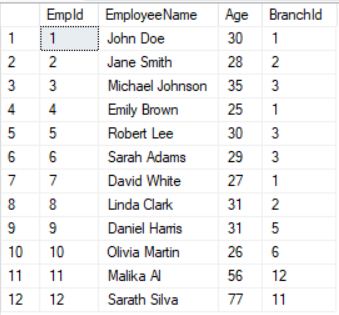
Here is my test data:

Branch Table


Employee Table


I have a table value function which brings branch id and average age of employees in that branch.
CREATE FUNCTION GetAverageEmployeeAgeByBranch
(
    @BranchId INT
)
RETURNS TABLE
AS
RETURN
(
    SELECT BranchId, AVG(Age) AS AverageAge
    FROM Employee
    WHERE BranchId = @BranchId
    GROUP BY BranchId
);

I need to show branch id, branch name and average employee age for that branch in my query. First I have used CROSS apply in my query.

SELECT b.BranchId, BranchName, e.AverageAge
From Branch b CROSS APPLY dbo.GetAverageEmployeeAgeByBranch(BranchId) as e
ORDER BY BranchId

Result as follows:

Then I have used OUTER APPLY:

SELECT b.BranchId, BranchName, e.AverageAge
From Branch b OUTER APPLY dbo.GetAverageEmployeeAgeByBranch(BranchId) as e
ORDER BY BranchId

Result as follows:

As you can see in the first result set, SQL server only brings branches where there are employees on them (i.e. inner join), but on second result set it has bring all branches, where it cannot find employee age, it has put null on them (like LEFT OUTER join).

You can also use APPLY operator with table value expressions (i.e. sub queries).

SELECT b.BranchId, b.BranchName, e.EmployeeName
FROM Branch b CROSS APPLY 
(SELECT e.BranchId, 
STRING_AGG(EmployeeName, ';') WITHIN GROUP (ORDER BY e.EmployeeName) As EmployeeName 
FROM Employee e WHERE e.BranchId = b.BranchId GROUP BY e.BranchId) as e

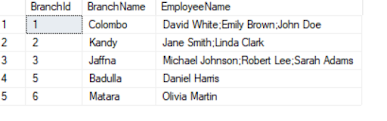
Above query brings concatenated employee names for a given branch:


SQL Server Performance Tuning Excersises - 1

Couple of weeks ago, I blogged about how I tried to use AI (Claude) to teach me performance tuning. You can read it here . Starting from thi...